Task Management
Task management that knows your data.
Organize your work with a visual Kanban board that connects directly to your data. Attach complete vehicle records, company profiles, and contact information to any task. Assign team members, set deadlines, and create reminders without switching tools. Drag and drop tasks between columns, search across all content, and archive completed work.
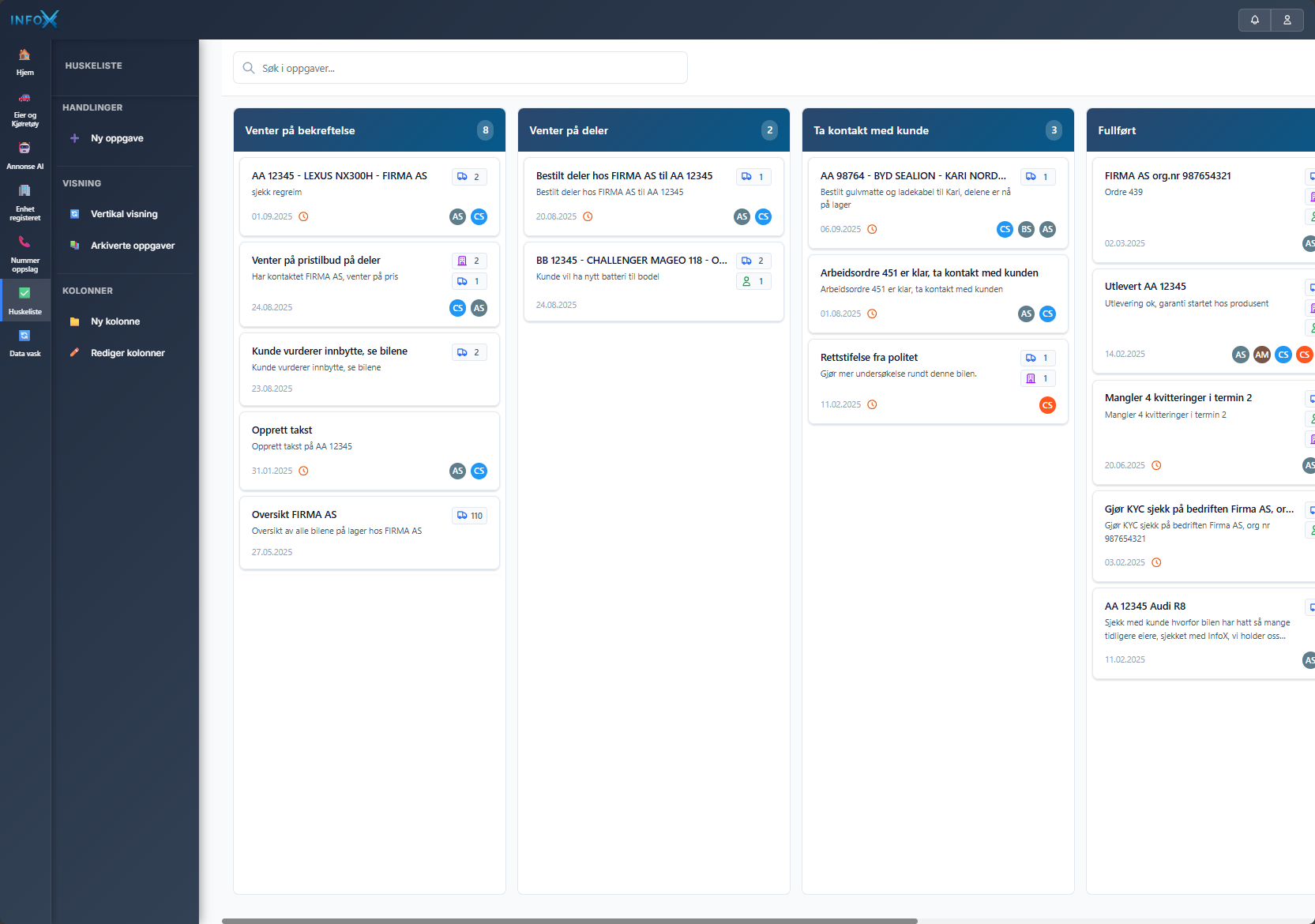
How Task Management Works
Create Custom Board
Set up custom boards for each project, customer flow, or workflow process. Define columns that match how your team works.
Add Tasks with Data
Create tasks and attach vehicle records, company profiles, or contact information directly from InfoX. Everything stays connected.
Collaborate and Track
Assign tasks to team members, add updates and notes, and move cards through your workflow as work progresses.
Review and Archive
Maintain a complete record of your workflow process, with all updates and decisions documented for future reference.
Powerful Features for Any Workflow
Custom Workflows
Create boards that match your exact process. Build workflows that guide your team through consistent, repeatable operations.
Integrated Data Access
Link tasks directly to InfoX data. Jump from task cards to vehicle lookups, company profiles, or contact searches without losing context.
Team Collaboration
Coordinate work across multiple team members. See who's working on what, track progress in real-time, and avoid duplicate efforts.
Complete Documentation
Every action is logged. Generate detailed reports and maintain complete process documentation for accountability and review.
Build Your Perfect Workflow
Order Management
Track orders from quote to delivery. Attach vehicle details, monitor parts ordering, and keep customers updated.
Customer Onboarding
Move new customers through your process. Track documents, approvals, and setup steps with attached contact information.
Vehicle Service Flow
Manage repair workflows from intake to completion. Track service status, parts needed, and technician assignments.
Sales Pipeline
Organize leads and opportunities. Attach company profiles, track follow-ups, and move prospects through your sales stages.
See It In Action
To Investigate
In Progress
Review
Completed
Live Kanban board showing customizable workflow
Frequently Asked Questions
How does it integrate with other InfoX features?
Seamlessly. Launch searches directly from task cards, attach vehicle records, company profiles, and contact information to any task without switching tools.
Is there a limit to team members or tasks?
No limits. Add unlimited team members to your workspace and create as many tasks as your workflows require.
Can I export task documentation?
Complete export capabilities let you generate workflow reports, activity logs, and task summaries in multiple formats.
Can I create templates for recurring workflows?
Yes. Save successful workflows as templates and reuse them for similar projects, ensuring consistency across your team.
Task Management That Transforms Your Workflow
vs. Generic Tools
- Data integration vs. copy-paste
- Workflow templates vs. blank boards
- Audit trails built-in vs. manual logging
- Security first vs. consumer-grade
vs. Spreadsheets
- Real-time collaboration vs. version conflicts
- Visual workflow vs. rows and columns
- Automated tracking vs. manual counting
- Searchable history vs. lost in cells
Task Management Included
All InfoX services require a platform license (499,- NOK/mnd). The prices below are only for actual usage.
Service Costs
Pay only for usage
No fixed quotas
Entire team included
Unlimited users
Scales with you
Grow without limitations
Organize Your Team's Work
Transform how your team manages workflows. Build custom processes that connect directly to your InfoX data.